
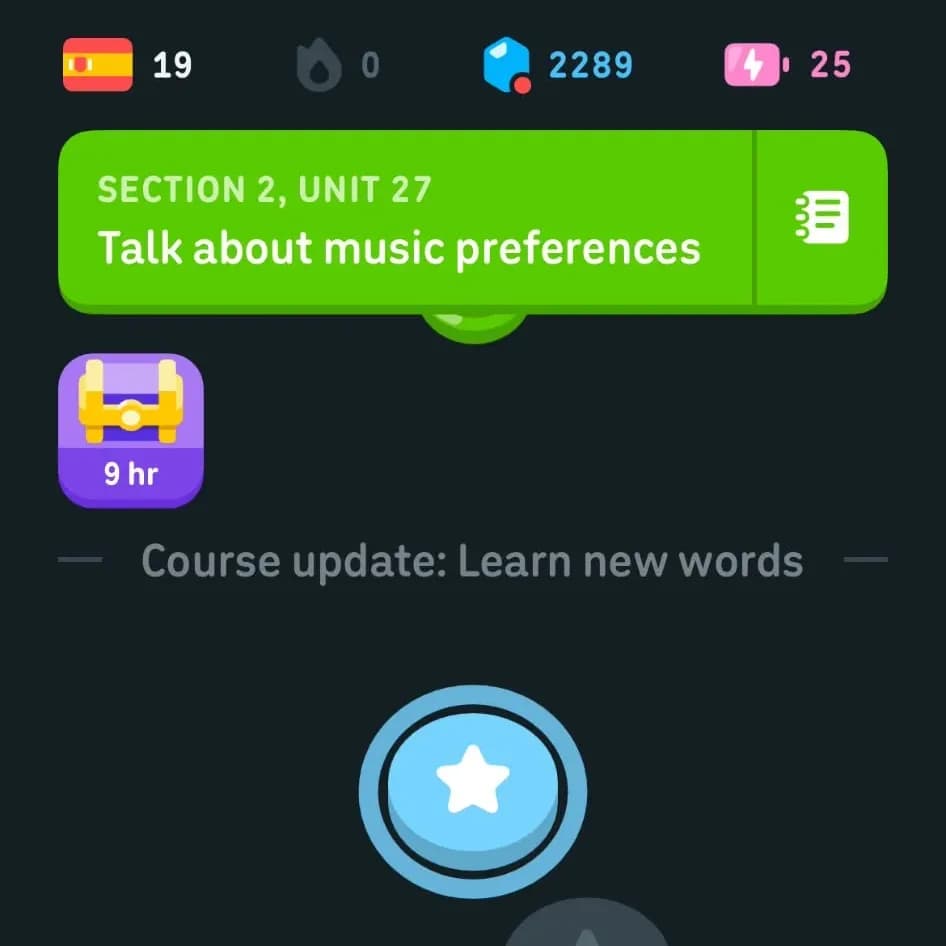




36,944 XP. A 325 day streak, now back at zero. 2,289 gems I never paid for. And a Spanish score of 19, which did not help me order a coffee. I have made most of the mistakes you can make in this app, some of them for months, so here is the short version of what I learned.
The Duolingo tips that matter most: turn the leaderboard off, keep 2 streak freezes equipped, say every sentence out loud, type instead of tapping tiles, and do the Stories. Check your Spanish outside the app every couple of months, and once you are past about 50 hours, keep Duolingo to 10 minutes a day and spend the rest on real Spanish.
In shortIf you only read this box5 points
- Three settings first: placement, leaderboard off, two freezes equipped.
- Out loud and typed beats silent and tapped. Same lesson, more Spanish.
- Gems belong on freezes and energy. You never need to buy any.
- Your Duolingo Score is a progress bar, not a level. Test yourself somewhere else.
- The app teaches a lot early and less later. Add real listening sooner than feels comfortable.
Before your first lesson: three settings to change
Most of what went wrong for me started in the first week, before I had any idea how the app was built. These three take a couple of minutes and save you months of habits you will want to undo later.
1. Take the placement test, or jump one section at a time
If you know any Spanish at all, take the placement test when you start the course. It adapts to your answers and drops you somewhere sensible. Already on the path? Every section further down has a Jump here button. Pass the short test and you skip ahead. Fail it and nothing happens, so it costs you nothing to try. Jump one section at a time, though. Skipping three in one go is how people end up drowning in the past tense with no present tense to stand on. The Spanish course guide shows what every section teaches.
2. Switch the leaderboard off
I am competitive, and the weekly leagues got ugly fast. Leagues pay for XP, and an easy old lesson pays the same points as a hard new one in half the time. That is great for the league and useless for Spanish. Find the leaderboard switch in your settings and turn it off. If you love it and it keeps you learning new material, fine. If you catch yourself replaying Unit 1 on a Sunday night to hold a rank, it is time.
3. Keep 2 streak freezes equipped
A freeze covers one missed day automatically, and you can hold 2 at a time. They only work if they are already equipped before the day you miss, so buy them on a good day, not after a bad one. My 325 day streak had less protection than it should have. The streak guide covers freezes, repairs and the newer shield.
Inside a lesson: squeeze more Spanish out of five minutes
A Duolingo lesson is short on purpose. You cannot make it longer, but you can make it work harder. These four cost nothing and change what you walk away with.
4. Say every sentence out loud
The free app has very little speaking in it. So add your own. Read every Spanish sentence out loud, even the ones you only have to tap. On the bus, mumble it. It feels silly for about a week, and then your mouth starts to know the shapes before your brain does, which is the whole point.
5. Type instead of tapping tiles
The word bank makes every sentence a puzzle where the answer is already on the screen. When a translation exercise offers Use keyboard, take it. You will be slower and you will get more wrong. That is the point. Having to pull a word out of your own head is what makes it stick.
6. Read Explain My Answer when you get one wrong
When an answer is wrong, Duolingo can tell you why. That used to be a paid feature, and since January 2026 it is free for most Spanish learners. Use it. The grammar tips in the app are short and easy to miss on a phone, so this little button is one of the few places where the app explains anything at all.
7. Slow down, and the energy bar lasts longer
Free learners get 25 energy. Every exercise spends a little, and a run of correct answers wins some back. So rushing costs you twice: more mistakes, less energy. Read the sentence twice before you answer.
When the bar runs low, the energy screen has a free +5, an ad for +5, and a full recharge for 600 gems. Try them in that order.
Streak tips that keep the flame from running your life
The streak is the best and worst thing in the app. It got me to open Duolingo 325 days in a row. It also turned a lot of those days into a chore I did for a number.
8. Do the streak lesson first thing, not last thing
A lesson at 8 in the morning is a lesson. A lesson at 23:50 is a panic. Do it with the first coffee, or on the way to work, and the rest of the day is free. If you do one thing from this page, make it this one.
9. Do a new lesson, not a replay
A long streak means you are learning a lot.
More XP means more Spanish.
A score of 19 means you can get by in a café.
Gems and the free features most people walk past
10. Spend gems on freezes and energy, nothing else
Quests and chests pay gems constantly. I have 2,289 of them and never bought a single one. That is 3 full energy recharges sitting in my account. Outfits for the owl and XP boosts are fun, but freezes and energy are the only things gems buy that keep you learning. If someone tells you to buy gems with real money, ignore them. And you do not need Super for any tip on this page. The free vs Super breakdown explains why I stay on the free plan.
11. Do the Stories
Stories are short illustrated dialogues with questions in between, and they are the best part of the free app. A story is Spanish as a little scene, with people who want things and get annoyed, instead of loose sentences about owls drinking milk. A finished story counts for your streak too.
12. Use the website when you have a keyboard
On duolingo.com you type your answers by default, which gives you tip 5 without thinking about it. Same account, same course, same streak. Keep the phone for the bus and the laptop for the longer sessions, when typing every answer is no hassle.
When the owl stops teaching you much
For me Duolingo flattened out after about 50 hours. It still taught me things, just much less per hour than it did at the start. These three tips are about not wasting the next fifty.
13. Test yourself outside the app every 2 months
Inside the app you always know what kind of sentence comes next. Outside it you do not. Every couple of months, try something Duolingo did not write: a short video, a menu, a level quiz. Our A1 Spanish quiz takes five minutes and tells you plainly whether the basics are there.
14. Add real listening early
Duolingo audio is slow and clear on purpose. The street is neither. The first time I tried to follow two native speakers who were not slowing down for me, I understood maybe a third. Once you know 500 to 1,000 words, start watching Spanish shows with Spanish subtitles. I use Lingopie for that, because I can click a word I do not know and it comes back later as a flashcard with the scene attached.
15. Past 50 hours, cap Duolingo at 10 minutes
I still open Duolingo most days, for about 10 minutes, as a warm-up. It keeps old words alive and costs nothing. But the main study time moved somewhere else. If you are torn between the two apps, I compare them properly in Duolingo vs Lingopie.
Which tips matter for where you are on the path
Not all fifteen matter on day one. Pick your stage.
- Placement test or Jump here, one section at a time (tip 1).
- Leaderboard off before it gets its hooks in (tip 2).
- Say everything out loud from the first lesson (tip 4).
- Lesson first thing in the morning (tip 8).
- Type instead of tapping (tips 5 and 12).
- Read Explain My Answer on every mistake (tip 6).
- Do the Stories in each unit (tip 11).
- Take a level quiz outside the app (tip 13).
- No replays for the streak, only new lessons (tip 9).
- Real shows with Spanish subtitles (tip 14).
- Duolingo down to about 10 minutes a day (tip 15).
Your Duolingo setup, in five minutes
0 of 6
Sources
- Duolingo blog, July 3, 2025: energy replaces hearts
- Duolingo blog, January 1, 2026: Explain My Answer is free
- Score, streak, gems, energy and path position are from my own Duolingo account (screenshots October 17, 2026). The XP total is from July 2026.