



Somebody put on “Bella Ciao” at a party once, and the bassline followed me home. It hummed under everything I did for days, until I went looking for where it came from. That's how I ended up two episodes into La Casa de Papel before dinner: red jumpsuits, a pace that never lets you breathe, and the Professor's calm voice holding the whole mess together.
One evening, half joking, I googled “learn Spanish while watching series”. Lingopie came up. I almost closed the tab, because my fear was simple: turn my new favorite show into homework and the show dies. It didn't. The learning layer sat on top of the story so quietly that I forgot it was there, right up until I wanted it.
Is Lingopie good for learning Spanish?
Yes, as long as you already know the basics. Lingopie turns Spanish shows into lessons with dual subtitles, click to translate and flashcards that keep the scene each word came from. It's built for learners around A2 to B2, so total beginners should start with Duolingo. At the time of writing the yearly plan is on sale for $83.88, about $6.99 a month, with a 7-day free trial.
In shortThe review in five lines5 points
- My rating is 4.5 out of 5. It's the best app I've tested for understanding Spanish the way people speak it on screen.
- Best for A2 to B2. If you can't order a coffee yet, build a base on Duolingo first.
- Saved words become flashcards tied to the scene they came from, which is why they stick.
- The Chrome extension puts Lingopie's subtitles on selected Netflix and Disney+ titles, but you need both subscriptions.
- The yearly plan is charged when the trial ends and can't be refunded. Set a reminder for day 6.
How a Money Heist bassline turned into a Spanish habit
So I kept watching. The Professor's crew walked into the Royal Mint and I walked in with them, except every now and then I paused and clicked a word that sounded useful. Each one dropped into a list. Later I'd scroll through that list on my phone at the bus stop or in a coffee queue, half a minute here, a minute there.
What surprised me was how little effort it took. I was picking up words like pebbles on a beach I was already walking on. The next day I'd run the word drills on the tram, and the words weren't strangers anymore. They had faces and scenes attached. Zero cramming. Full joy. That's still the best summary I have of those first weeks.
What changed, and how fast
I tested Lingopie properly from January 2026, side by side with the other apps in my ranking of the best apps to learn Spanish. This is roughly how it went:
January 2026
Shows I would have watched anyway
Clicking words during episodes, reviewing them on my phone in dead minutes.
About week 3
Simple conversations started to make sense
Not every word, but the shape of what people were saying.
About month 2
Following a series without pausing every five seconds
The point where it stopped feeling like study and started feeling like TV.
May 2026
Booked a live group lesson
With a teacher called Fedra. More on that further down.
How fast this goes for you depends on how much Spanish you bring and how many evenings you put in, so read it as one learner's diary, not a promise.
What Lingopie is, and what it isn't
Lingopie is a streaming service built for language learners. Picture a small Netflix where every show comes with interactive subtitles and a vocabulary toolkit bolted on. It was founded in 2019 by David Datny and Roy Oppenheim, and the origin story is pleasingly simple: Datny learned Hebrew by watching Hebrew TV with Hebrew subtitles and wanted to make that method easier for everybody else.
Today it covers 15+ languages, says it has more than 2 million learners and lists over 5,000 shows, podcasts and books. Spanish has the biggest catalog of the lot, which is good news if Spanish is why you're here.
What it isn't is a course. There's no lesson one, no unit on the present tense, nobody marching you from hola to the subjunctive. You bring a bit of Spanish, Lingopie brings the shows and the tools, and the learning happens somewhere in between.
Lingopie at a glance
- Best for
- Spanish learners around A2 to B2
- Languages
- 15+Spanish has the largest catalog
- Catalog
- 5,000+ titlesShows, movies, podcasts and books across all languages
- Apps
- Web, iOS, Android, Fire TV, Roku, Google TV and Android TV, Samsung TV, Apple TV
- Chrome extension
- Selected Netflix and Disney+ titlesDesktop Chrome only, your own streaming subscription needed
- Free trial
- 7 days, full accessCard required
- Price
- From $6.99 a monthYearly plan on sale at $83.88, checked October 14, 2026
- My rating
- 4.5 / 5
How Lingopie works for learning Spanish
Underneath the shows sits a fairly deep toolkit. These are the parts that matter most for Spanish, in the order you'll bump into them.
Dual subtitles: Spanish on top, English underneath
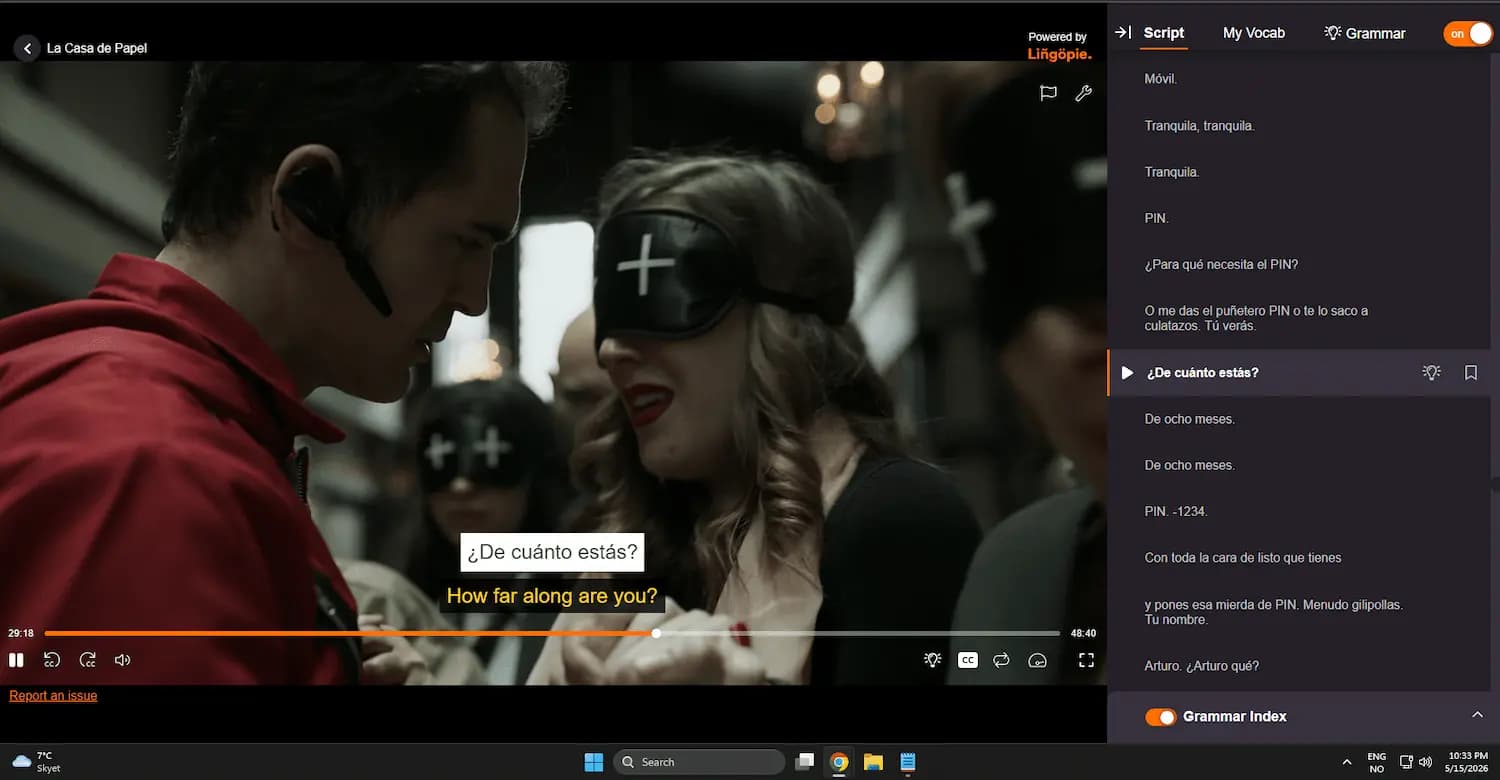
This is the heart of it. Spanish subtitles sit on top, English below, and you can switch either one off. It's also why I prefer a big screen: two lines of subtitles need room, and on a laptop or monitor they never crowd the picture.
My suggestion is to keep both on at first, then try reading the Spanish line before your eyes drift down, and only glance at the English when you're lost. For an episode you've already seen, turn the English off entirely. The searchable transcript on the side (the Script tab in my screenshot) is quietly brilliant too. Missed a line? It's right there with a play button next to it.
Click any word for a translation
Click a word in the Spanish subtitle and a little card pops up with the translation, the word type and a speaker icon for the pronunciation. You can save the word from that same card without leaving the scene.
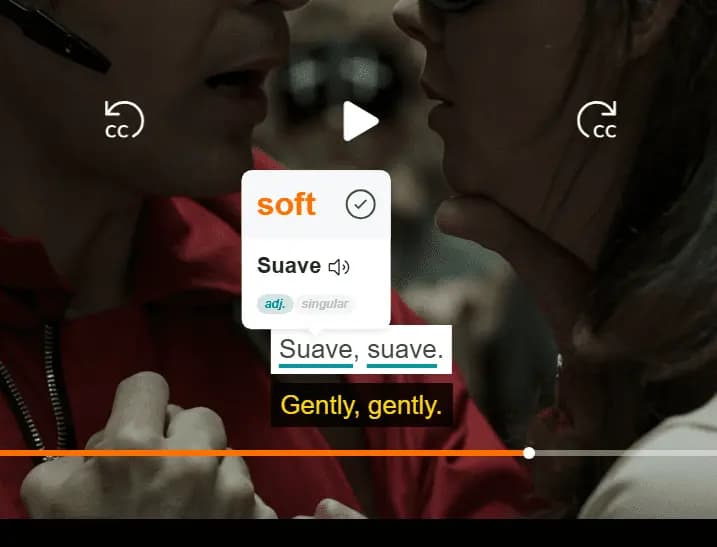
That screenshot shows a small thing worth noticing. The card says suave means soft, while the subtitle turns the line into “gently, gently”. Seeing the dictionary meaning and the natural translation side by side teaches you more than either would alone, because it shows you how a word bends to fit a moment.
Flashcards that remember where you heard the word
Every word you save becomes a flashcard, and this is where Lingopie pulls away from most apps I've tried: the card keeps its scene. When entrar came up in my reviews, I didn't see a dictionary entry. I saw the Professor explaining how they would get into the Banco de España. You don't learn words in a vacuum here, and your memory is grateful for it.
Reviews follow spaced repetition, so a new word comes back after 1, 4, 7 and 15 days, spreading out as it sticks. There are games as well: a quiz, Word Master, grammar drills and comprehension questions. For me the flashcards did the heavy lifting, on the tram and at the bus stop.
Speed control, looping and auto-pause
You can slow a show down to 0.5x or push it up to 2x, loop a line until it clicks, and turn on auto-pause so the video stops after every subtitle. My advice: start at 0.7x, move to normal speed once that feels easy, then try 1.25x. Fast Spanish is a lot less scary once you've heard the same people talk slowly.
Grammar Coach and Say It
Two AI features sit on top of the shows. The Grammar Coach explains a line in context, the kind of question it answers being why the hostage in my screenshot is asked “¿De cuánto estás?” with estar and not ser. Say It lets you repeat a line out loud and scores your pronunciation.
Both are useful, and both remind you now and then that they're machines. The AI translations occasionally slip, giving you a meaning that's close but not quite what the character means. Treat them as a helpful friend with a phrasebook, not as a teacher.
Spain or Latin America: pick your Spanish
Spanish isn't one accent, and Lingopie doesn't pretend it is. The catalog mixes shows from Spain and Latin America, and you can filter by country. Heading to Madrid? Stick to Spain and get used to vosotros and that lisped “c”. Mexico or Colombia on the cards? There are collections called Best of Spain, Best of Mexico and Best of Colombia to start from.
Money Heist is Madrid Spanish, fast and generous with swear words. Glance at the script panel in my screenshot and you'll spot a couple that Duolingo will never teach you, which is an education of its own.
Web, phone or TV: where Lingopie works best
I almost always use Lingopie in a browser on my PC. The big screen gives both subtitle lines room, the script panel fits next to the video, and it's the only place the Chrome extension runs. The phone app is fine for short sessions and great for word review. The TV apps are for the sofa.
My default. Both subtitle lines, the script and My Vocab side by side, plus the Netflix extension in Chrome. If you only try one setup during the trial, make it this one.
iOS and Android. Good for a single episode on the go and for clearing your flashcards in a queue. On iOS you can download episodes to My Library and watch offline, handy on a flight. Two subtitle lines plus a translation card is a lot for a small screen, so I keep longer sessions for the computer.
Fire TV, Roku, Google TV and Android TV, Samsung and Apple TV all have apps. This is the lean-back option, with dual subtitles on the big screen. Looking words up with a remote will never be as quick as a mouse click, so I'd save the TV for episodes where you mostly want to listen.
The Chrome extension: Lingopie on top of your own Netflix
If you already pay for Netflix, this part is worth knowing about. Install the free Lingopie extension in Chrome, open Netflix, and an orange “Lingopie Ready Shows” button appears in the menu bar. Pick a show from that list and Netflix plays as normal, except the subtitles are Lingopie's: clickable, in two languages, and wired to your word list. In my experience there was no stutter and no drop in picture quality.
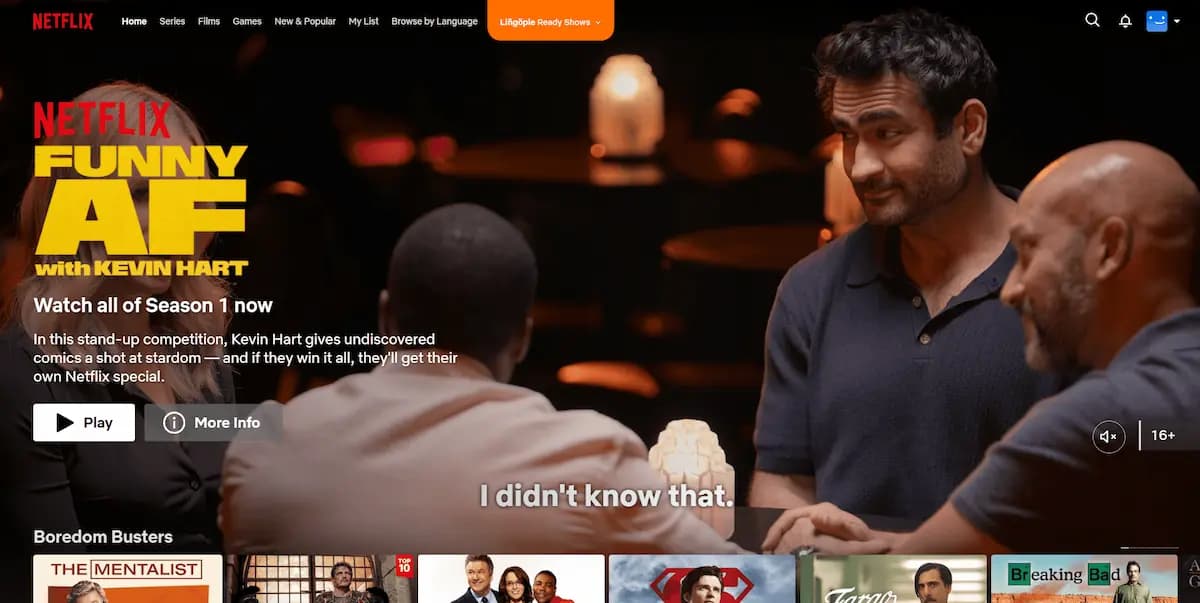
It isn't a new trick, by the way. The extension has been around since about 2023, so it's a settled part of the product rather than a beta experiment. If your favorite show is on Netflix, check the Ready Shows list during the trial before you count on it.
Live group classes: the most underrated part of Lingopie
Lingopie also runs live group lessons on Zoom with real teachers, and in May 2026 I booked one. This is the schedule I picked from:
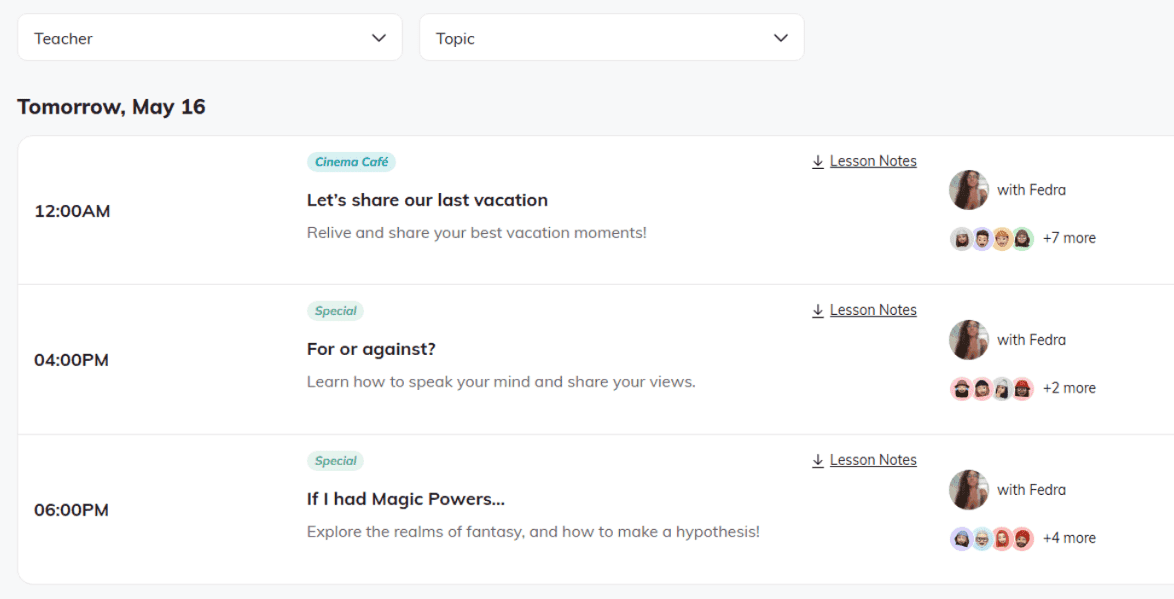
The topics are the sort you can tackle with modest vocabulary and still enjoy. “Let's share our last vacation” is an easy warm-up. “For or against?” is about saying what you think and defending it. “If I had Magic Powers…” is a sneaky way to practice hypotheticals, the grammar that frightens most of us. Look at the little avatars and you'll see the groups are small, small enough that you get to speak, which is the whole point.
In my Norwegian review I called the classes maybe the most underrated feature I've seen in a language app, and I stand by it. Shows train your ear. A teacher and a handful of strangers train your mouth. Getting both from one company is rare.
How big is Lingopie's Spanish catalog?
Spanish is Lingopie's largest library, and it's a proper mixed bag: telenovelas, crime and drama, comedies, travel and cooking shows, movies and even kids' cartoons, from both Spain and Latin America. Next to the video there are short stories, audiobooks and podcasts for when you'd rather listen than watch. Vis a Vis (Locked Up), the prison drama from the creator of Money Heist, is on there too.
Kids' cartoons sound like a joke until you try them. Short sentences, clear voices and lots of repetition make them the training wheels of Spanish TV, and nobody has to know you're watching them. Cooking shows are the other underrated corner: people narrate what they're doing with their hands, so the picture explains the words.
What Lingopie costs in 2026
Lingopie's prices move around a lot, and there's nearly always a sale on. When I checked on October 14, 2026, the website was running a fall sale with these plans:
Lingopie plans, checked October 14, 2026
- 3-Month
- $41.97 every 3 monthsWorks out to $13.99 a month. One language.
- Yearly
- $83.88 a year$6.99 a month. Regular price $167.80, so 50% off. All languages.
- Lifetime
- $229 onceRegular price $763.
- Monthly
- Not offered on the websiteOnly inside the iOS app
- iOS in-app
- $13.99 a month, or $59.99 to $83.99 a yearApple prices differ from the website and change with offers.
A few things jump out. There's no monthly plan on the website, so the shortest commitment there is three months. The 3-Month plan covers one language, while Yearly unlocks all of them. Over a full year, paying quarter by quarter costs $167.88, which is $84 more than the yearly plan. Lifetime at $229 only beats the sale yearly price after about 2.7 years, which is a long time to bet on any app.
3-Month or Yearly? Run your own numbers
The calculator below compares monthly and yearly billing, so I've fed it the 3-Month plan's per-month price ($13.99) as the “monthly” figure. One caveat: the 3-Month plan bills in blocks of three, so if you pick a number of months that isn't a multiple of three, your real cost rounds up to the next block. Both prices are editable in case they've changed by the time you read this.
Calculator
Monthly or yearly: which plan is cheaper for Lingopie?
The yearly plan saves you
$42.03
- Monthly, 9 months
- $125.91
- Yearly, 1 year
- $83.88
- Yearly works out per month
- $9.32
The yearly plan pays for itself once you use Lingopie for 6 months or more. Be honest with yourself about that number.
- Pay monthly$125.91
- Pay yearly$83.88
A yearly plan is paid up front and covers 12 months. Prices change, so check the current price on the checkout page. Taxes are not included.
The tipping point comes early. Two 3-Month blocks already cost $83.94, $0.06 more than a whole year on the sale price. If you think you'll still be watching in six months, the yearly plan is the obvious pick. If you're not sure, that's what the trial is for.
How the 7-day free trial works, step by step
The trial gives you full access for 7 days. You need a card to start it (payments go through Stripe, cards only), and that's where people get caught out. This is how it works and what I'd do:
Pick the plan you'd keepDay 1
The trial rolls into the plan you choose, so pick the one you'd be happy paying for if you forget.
Add your cardDay 1
A small amount is reserved to check the card is valid. It isn't a charge, and it's released later.
Don't panic about the invoiceDay 1
An invoice is created when the trial starts, but nothing is charged until day 7.
Set a calendar reminderDay 6
My one real tip. Put it in your calendar the moment you sign up, and on day 6 decide with a clear head whether you want to keep going.
Keep it or cancelDay 7
Do nothing and the plan starts and renews automatically. Cancel before then and you pay nothing.
Use the week properly. Pick one show, watch a few episodes, save a handful of words from each and review them on your phone. If you have Netflix, try the extension too. A week is plenty to know whether this way of learning suits you.
Who Lingopie is for, and who should skip it
Lingopie works best in a fairly specific window. Too early and every show is a wall of noise. Too late and you can watch Spanish Netflix without any help. In between, roughly A2 to B2, it's the best tool I know.
Lingopie suits you if you
- know the basics and want to level up
- love series and find drilling boring
- have hit a plateau on Duolingo
- are about to travel and want to tune your ear to fast Spanish
- already pay for Netflix and want more out of it
- want regular conversation with a teacher without paying for private tutors (check the group lesson plan first)
Look elsewhere if you
- are an absolute beginner (start with Duolingo)
- want a systematic A to Z grammar course
- are preparing for an exam with a fixed syllabus
- get stressed by full-speed Spanish
On the travel point: unless your plan is to pull a Bald and Bankrupt and wander into Cuba with almost no Spanish, a few weeks of shows before a trip makes native speed feel far less like a wall. And if you want proof that an ear can be trained, watch the travel YouTuber Kurt Caz in order. His Spanish gets visibly better over the years, and he's the reason I fell for the language in the first place.
Is Lingopie right for you? Six quick questions
Can you already handle simple Spanish, like ordering food or a slow chat?
Not sure where you stand? My free Spanish A1 level quiz takes a few minutes. If it feels easy, you're probably ready for Lingopie's gentler shows.
Lingopie vs Duolingo for Spanish
People like to frame this as a fight. It isn't one. Duolingo builds words and grammar from zero. Lingopie takes you from “I know a little” to “I understand what they're saying”. Different jobs, different stages.
In my full Duolingo review for Spanish I called the owl a great front door and a weak place to live long term, and nothing here changes that. If you're wondering how far the app alone can carry you, I dug into exactly that in is Duolingo enough to learn Spanish. The short version: no, and Lingopie is one of the best answers to “what next?”
My rule of thumb: learn your first 500 to 1,000 words on Duolingo, then move the bulk of your time to Lingopie. Better still, keep both.
Duolingo on the bus, Lingopie on the sofa.
| Criterion | LingopieShows firstWins 3 of 6 | DuolingoLessons firstWins 3 of 6 |
|---|---|---|
| Starting from zero | Too fast for a true beginner | Winner: Built for it |
| Native-speed listening | Winner: Real shows, slowed down if you want | Short, clean, slow sentences |
| Vocabulary that sticks | Winner: Every word tied to a scene | Words in tidy example sentences |
| Grammar path | Grammar Coach on demand, no syllabus | Winner: Step by step path, thin explanations |
| Speaking with people | Winner: Live group classes (separate plan) | No human teachers |
| Price | From $6.99 a month on the yearly sale | Winner: Free tier covers the whole course |
Duolingo details from my Duolingo review. Lingopie prices checked October 14, 2026. The longer comparison is in Duolingo vs Lingopie.
Lingopie is just Netflix with subtitles.
Normal subtitles vanish as you read them. Lingopie's stay clickable, feed a word list and come back as flashcards with the scene attached. That loop is the product.
You can start Spanish from zero on Lingopie.
You can, but you'll drown. Without a few hundred words every scene is noise. Get the basics on Duolingo first, then switch.
Finish the Duolingo path and you'll understand native speakers.
Duolingo's audio is slow and clean on purpose. Real dialogue is fast, messy and full of slang. I wrote about where Duolingo stops for Spanish learners and what to add when it does.
Five habits that get the most out of Lingopie
Pick a show you'd watch anyway
A telenovela, a crime series, a comedy, whatever you'd choose on a Friday night. If you're only watching because it's “good for you”, you'll quit by episode three. The story is what brings you back, and coming back is what teaches you.
Click fewer words than you want to
It's tempting to click everything. Then your flashcard pile turns into a chore and you stop opening it.
Turn the speed up slowly
Start at 0.7x, move to 1x when that feels comfortable, and try 1.25x on episodes you already know. Going faster than normal sounds mad, but when you drop back to regular speed afterwards, it suddenly feels roomy.
Use the extension on your Netflix favorites
If you have Netflix, check which of the shows you already love are on the Ready Shows list. Rewatching something you know in Spanish is far easier than meeting a new story and a new language at the same time.
Book a group class every week
If the group lesson plan fits your budget, one class a week turns everything you've heard into something you can say. Watching gives you the words, and the class is where you find out which ones you own. For free material in between, my Spanish learning portal collects quizzes and phrase lists as I make them.
My verdict: 4.5 out of 5
Lingopie for Spanish, scored
The best app I've tested for understanding how people talk. Not a course.
Listening and comprehension5 / 5
Where it beats every app I tested.
Vocabulary in context5 / 5
Flashcards that keep the scene.
Spanish catalog4.5 / 5
Spain and Latin America, cartoons to crime.
Apps and Chrome extension4.5 / 5
Best on a computer. The extension covers selected titles only.
Value for money4.5 / 5
Strong on the yearly sale, weaker on the 3-Month plan.
Structure for beginners3.5 / 5
No syllabus from day one, and the AI slips now and then.
Of all the apps I've tested, Lingopie is the one I've spent the most time with without feeling like I was working. That's the review in one sentence, and it's why it sits at number one in my ranking of Spanish apps.
It isn't perfect. The AI translations slip now and then, and nobody hands you a structured path on day one, so a true beginner will feel lost. The best Duolingo alternative for learning how people really talk still needs you to show up with some Spanish in your pocket.
What won me over
- Learning from shows you'd watch anyway
- Flashcards that keep the scene
- Spain and Latin America, with a country filter
- A Chrome extension for your own Netflix
- Small live group classes
What held it back
- No structured syllabus from day one
- AI translations occasionally slip
- The extension covers selected titles only
- The yearly plan can't be refunded once charged
- Group lessons now sit on a separate plan
This is one learner's experience, and how fast you progress depends on you, your level and your evenings. Prices and plans change often, so check the checkout page before you pay. More in the disclaimer.
Sources
- Lingopie pricing page, fall sale prices checked October 14, 2026.
- Lingopie Help Center articles on the free trial, refunds, Group Lessons and the Chrome extension, checked October 14, 2026.
- Lingopie, official website, for languages, catalog size, learner numbers and the company's founding story.
- All Lingopie screenshots are from my own account. The La Casa de Papel, group lesson schedule and booking email screenshots were taken in May 2026.
- My own testing of Lingopie and other Spanish apps, January to March 2026, and my earlier Norwegian review of Lingopie.